Tuesday, 7 June 2011

A new stable release of Chrome: safer and snazzier

Today’s new stable release of Chrome brings improvements in security, privacy, and graphics to Chrome’s 160 million users.

Chrome is now more secure, thanks to enhancements to our Safe Browsing technology. In addition to protecting you from certain malware and phishing websites, Chrome now warns you before downloading some types of malicious files. We’ve carefully designed this feature so that malicious content can be detected without Chrome or Google ever having to know about the URLs you visit or the files you download.

Chrome also now gives you more control over the data that websites store on your computer. This includes Flash Player’s Local Shared Objects (LSOs), which were previously only manageable using an online settings application on Adobe’s website. We’ve worked closely with Adobe to integrate Flash LSO deletion directly into Chrome, making it easier for you to manage your online privacy.

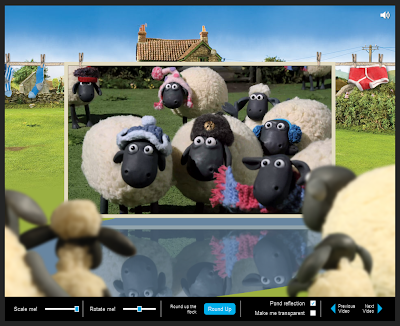
Finally, Chrome’s graphics capabilities continue to improve. This release includes support for hardware-accelerated 3D CSS, which means you’ll get a snazzier experience in some web pages and web apps that choose to implement 3D effects. To see hardware-accelerated 3D CSS in action, check out this Chrome Experiment on Windows Vista / Mac OS X 10.6 or above, featuring clips from Aardman Studio's “Shaun the Sheep.” In this simple experiment, you can rotate the video, scale it up and down, toggle the reflection on and off, and activate a rotating carousel of videos. Of course, you can also just enjoy the animated antics of a few funny animals.


As always, Chrome users will be automatically updated to this new version of Chrome in the coming days. As Chrome continues executing on its six-week release schedule, we’ve got many more improvements coming your way. Check back in a few weeks for our next beta channel release!

Thursday, 2 June 2011

The curious guide to browsers and the web: now in 15 languages and open-sourced

When we published the illustrated HTML5 web book, 20 Things I Learned about Browsers and the Web, late last year, we were excited by the positive response from teachers, web developers and many of you who shared in the joy of rediscovering how the web works.

Today, we've made this web book available in 15 languages, including Bahasa Indonesia, Brazilian Portuguese, Czech, Dutch, English, French, German, Italian, Japanese, Polish, Russian, Chinese (Simplified and Traditional), Spanish, and Tagalog. If you have family members and friends around the world who speak these languages, you can point them to the translated guidebook at www.20thingsilearned.com, where illustrator Christoph Niemann brings to life topics ranging from 什麼是網際網路? (“What is the Internet?) to so schützen moderne browser vor malware und phishing (“How modern browsers protect you from malware and phishing”) and otevřený zdrojový kód a prohlížeč (“Open source and browsers”).


For those of you who want to tinker with the code and build your own web books, you can now dive into the HTML5, JavaScript and CSS used to build 20 Things I Learned with the fully open-sourced code. In developing this web experience, we took inspiration from the things we love about books and extended them to the world of bits and bytes with the capabilities of modern web technologies. We paid special attention to finding the right balance and weight in the cover and page flips; making the book available offline, easily searchable, as well as bookmarkable by allowing you to pick up where you previously left off; and implementing a "lights-off" mode to simulate reading with a flashlight under the covers.

20 Things I Learned was celebrated this year as an Official Honoree at the 15th Annual Webby Awards in the categories of Education, Best Visual Design (Function) and Best Practices. To learn more about the technical details behind some of the most-loved features of the book, see our post on the Google Code Blog.


We hope you’ll continue to find this curious guide to browsers and the web useful and informative. 20 Things I Learned is best experienced in Chrome or any up-to-date, HTML5-compliant modern browser. For those of you who’ve previously read this web book, don’t forget to hit refresh on your browser to see the new language options.


Friday, 13 May 2011

3D dreams in the modern browser

[cross-posted on the Official Google Blog]

Some of the most compelling experiences on the web come when inspirations of old are brought to life with modern technologies. Last August, “The Wilderness Downtown” brought the wistful feeling of nostalgia to the browser as you run down the streets where you used to live in an HTML5 music experience based on the Arcade Fire song “We Used to Wait.”

“3 Dreams of Black” is our newest music experience for the web browser, written and directed by Chris Milk and developed with a few folks here at Google. The song, “Black,” comes off the album ROME, presented by Danger Mouse & Daniele Luppi, featuring Jack White and Norah Jones on vocals and soon to be released on the record label Parlophone/EMI. ROME is inspired by Italian soundtracks from the 1960s and the classic Italian Western genre. In fact, the album was recorded with the original orchestra from Italian director Sergio Leone’s westerns (remember The Good, The Bad & The Ugly?).

“3 Dreams of Black” is a visual voyage through three dream worlds, told through rich 2D drawings and animations that are interspersed with interactive 3D sequences. At various points in this web experience, you can take control with your computer’s mouse and guide your journey through the unfolding narrative. You can even contribute to the dream by creating your own relics using a 3D model creator. Some of the best user creations will be integrated into the experience and become a part of others’ “3 Dreams” exploration.


In “3 Dreams in Black”, the browser is transformed into a theater for these lucid virtual dreams through WebGL, a new technology which brings hardware-accelerated 3D graphics to the browser. With WebGL in modern browsers like Google Chrome, you can interact with 3D experiences with no need for additional software. For curious web developers out there, we’ve made all the code completely open and available so that you can dig in, have a look around and try it out for yourself.

Because “3 Dreams in Black” is an experiment built with the latest web technologies, it requires a browser that supports WebGL like Chrome, and Windows Vista / Mac OS X 10.6 or above to help ensure that your computer has up-to-date graphics drivers. For those of you who may have hardware constraints, we’ve put together a short video that we hope will provide a glimpse into this unique experience. To explore these dreamscapes, visit www.ro.me.

Thursday, 12 May 2011

A flock of apps storming the Chrome Web Store

They are coming. They are angry. Protect your pigs.

Angry Birds, the most popular game for mobile devices, has arrived in the Chrome Web Store. Built using the latest technologies, Angry Birds is as much fun on the web as on your phone. In addition, you can try beating the new web-only, Chrome-inspired levels.

While firing up that slingshot, you may also want to try out some of the other apps that were recently added to the store. To keep up with the world of finance, you can install the Reuters and Fortune 500 apps. ESPN Cricinfo brings the latest cricket news straight to your new tab page. For the photo enthusiasts among you, LiveShare helps aggregate your friends’ photos from events you attended together.

In addition to the new apps added today, popular apps such as Springpad and Graphicly have been updated to work offline. This makes them even more useful, especially to those of you who snap up one of our new Chromebooks.

Finally, for those of you who prefer to surf the web in a different language, we’ve made the Chrome Web Store available in 41 languages. This is just a first step towards launching the store in 15 more countries with locally relevant applications. Some, like SKY for the UK and EXAME for Brazil, have already appeared in the store.

To play with all of these goodies and the more than 19,000 other items in the Chrome Web Store, you can start by downloading Google Chrome at google.com/chrome.

Wednesday, 11 May 2011

A new kind of computer: Chromebook

A little less than two years ago we set out to make computers much better. Today, we’re announcing the first Chromebooks from our partners, Samsung and Acer. These are not typical notebooks. With a Chromebook you won’t wait minutes for your computer to boot and browser to start. You’ll be reading your email in seconds. Thanks to automatic updates the software on your Chromebook will get faster over time. Your apps, games, photos, music, movies and documents will be accessible wherever you are and you won't need to worry about losing your computer or forgetting to back up files. Chromebooks will last a day of use on a single charge, so you don’t need to carry a power cord everywhere. And with optional 3G, just like your phone, you’ll have the web when you need it. Chromebooks have many layers of security built in so there is no anti-virus software to buy and maintain. Even more importantly, you won't spend hours fighting your computer to set it up and keep it up to date.

At the core of each Chromebook is the Chrome web browser. The web has millions of applications and billions of users. Trying a new application or sharing it with friends is as easy as clicking a link. A world of information can be searched instantly and developers can embed and mash-up applications to create new products and services. The web is on just about every computing device made, from phones to TVs, and has the broadest reach of any platform. With HTML5 and other open standards, web applications will soon be able to do anything traditional applications can do, and more.

Chromebooks will be available online June 15 in the US, UK, France, Germany, Netherlands, Italy and Spain. More countries will follow in the coming months. In the US, Chromebooks will be available from Amazon and Best Buy and internationally from leading retailers.

Even with dedicated IT departments, businesses and schools struggle with the same complex, costly and insecure computers as the rest of us. To address this, we’re also announcing Chromebooks for Business and Education. This service from Google includes Chromebooks and a cloud management console to remotely administer and manage users, devices, applications and policies. Also included is enterprise-level support, device warranties and replacements as well as regular hardware refreshes. Monthly subscriptions will start at $28/user for businesses and $20/user for schools.

There are over 160 million active users of Chrome today. Chromebooks bring you all of Chrome's speed, simplicity and security without the headaches of operating systems designed 20 to 30 years ago. We're very proud of what the Chrome team along with our partners have built, and with seamless updates, it will just keep getting better.

For more details please visit www.google.com/chromebook.


Monday, 9 May 2011

Fancier graphics, safer downloads, and more privacy controls

Today’s beta channel release includes a number of additions, as well as one subtraction!

First, we’ve made Chrome’s graphics snazzier. We’ve finished implementing support for hardware-accelerated 3D CSS, which allows web developers to apply slick 3D effects to web page content using CSS.

Second, we’ve taken Safe Browsing a step further. In addition to protecting you against malware and phishing websites, Chrome now warns you before downloading some types of malicious files. As mentioned on the Chromium blog in April, Chrome uses the same fancy algorithms for checking downloads as it does for checking websites, so Google can help protect you without ever needing to know the URLs you visit or the files you download.

Third, you now have more control over your online privacy. Many websites store information on your computer using forms of local data storage such as Flash Local Shared Objects (LSOs). In the past, you could only delete Flash LSOs using an online settings application on Adobe’s website, but we’ve worked closely with Adobe to allow you to delete Flash LSOs directly from Chrome’s settings. You can learn more in our post on the Chromium blog.

Fourth, we’ve improved screen reader support in Chrome. Many people who are blind or visually impaired use a screen reader, a special type of software that describes the contents of the screen using synthesized speech or braille. It’s a very important technology for people who would otherwise be unable to use a computer, so we’ve added preliminary support for many popular screen readers including JAWS, NVDA, and VoiceOver.

Finally, the subtraction: In this beta release, we’ve removed the Google Gears plug-in, as promised on the Google Gears blog in March. We’re excited about the potential of HTML5 to enable powerful web applications, and we hope that Google Gears rests in peace.


Wednesday, 27 April 2011

Everybody’s talking (and translating) with Chrome

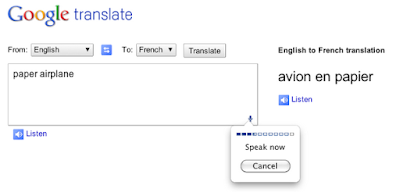
Today, we’re excited to make a nifty feature widely available in today’s new Chrome stable release: speech input through HTML.

Curious about how speech input can be used in real life? Here’s one example: Using Chrome, you can now translate what you say into other languages with Google Translate. If you’re translating from English, just click on the microphone on the bottom right of the input box, speak your text, and choose the language you want to translate to. In fact, you can even click on the “Listen” feature to hear the translated words spoken back to you!


Speech input through HTML is one of many new web technologies in the browser that help make innovative and useful web applications like Google Translate’s speech feature possible. If you’d like to check out more examples of applications built using the latest and greatest web technologies in the browser, you can check out more than 200 submissions by web developers on chromeexperiments.com. If you’re not already using Chrome, don’t forget to first download Chrome at google.com/chrome.